
Evaluate your internet (broadband, wifi, mobile), and compare with friends and family.
No meaningless national league tables.
NetSeal league tables have the comparisons you want to make, with people you invite to take part in your own measurement league.
Is your internet slow?
Does it buffer video?
Is the picture breaking up, and dropping audio?
Do you know if it’s your wifi, or your ISP, to blame?
Why is your internet slow?
The Internet Service Providers (ISPs) now have nowhere to hide - they provide you with fibre into your home, running at 1Gbps or thereabouts, but still your video buffers!
Clearly, it is no longer about speed, so speed tests won’t tell you anything useful.
What is going on?
Well, it’s all about how your ISP manages their network infrastructure.
Traffic congestion is the reason your internet feels slow.
And that happens when paths get temporarily overloaded.
(Too many customers chasing not enough resources - like the rush-hour morning commute!)
Where is the congestion?
It can happen at home (your wifi shares radio spectrum with neighbouring wifi networks).
And it happens in the ISP (your traffic shares network arteries with other customers).
What is the impact?
Bottlenecks occur, delays rise, data packets get dropped. Sometimes you notice, sometimes you don’t.
We call this network cholesterol - because it clogs network arteries.
And we detect it using latency, not speed, measurements. (Speed tests cannot capture the detailed behaviour that impacts your experience of using internet applications.)
What can you do?
measure - analyse - compare
Measure - from your browser across your ISP to well-connected cloud providers
Analyse - network cholesterol analysis crunches latency measurements into a network power value (on a scale of 0 to 100: the higher the value, the better managed the ISP)
Compare - rank your ISP’s network power against those of your friends, and see how variable it is
What will you see?
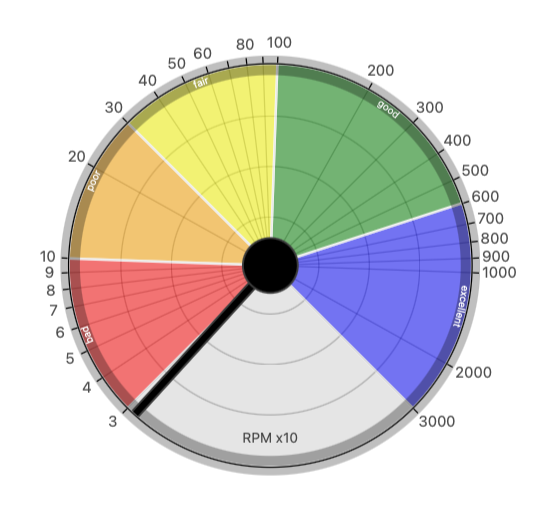
Latency measurements are shown on an RPM counter - that’s Round-trips Per Minute. (A round-trip is the time it takes to send a data packet from your browser to a cloud service and back again.)
So 1000 RPM is the same as a round-trip of 60ms (1000 * 60ms = 1 minute).
We divide the range from 2ms up to 2 seconds (that's 30000 RPM down to 30 RPM) into 5 sub-ranges that correspond approximately to the subjective experience categories: excellent, good, fair, poor, bad.
How does it work?
On the RPM counter we plot a trace of RPM values (so you can see just how variable, or otherwise, your latency behaviour is), and the pointer shows the median RPM value.
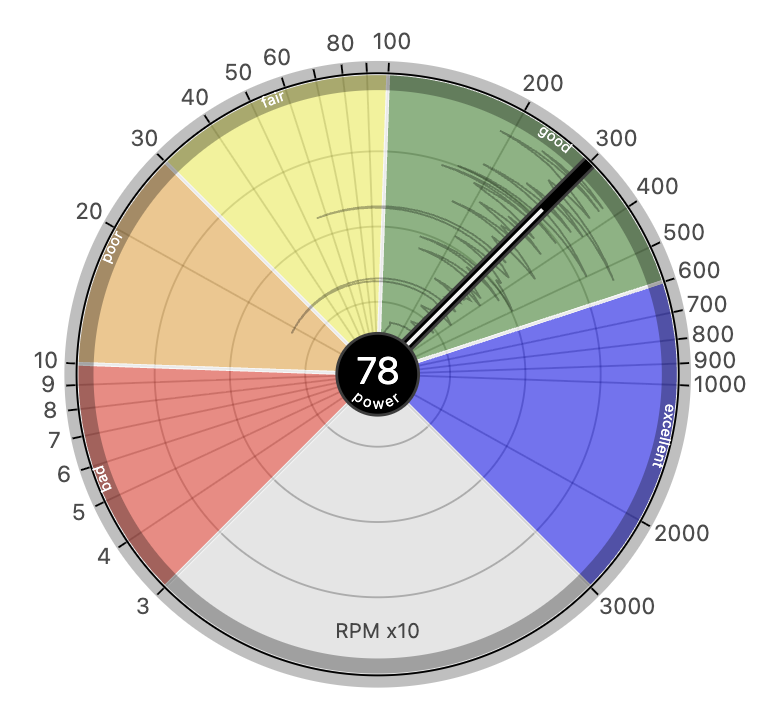
We then ship all of the latency data up to our cloud servers (to crunch the numbers using powerful network cholesterol analysis) and return a network power value.
What does it mean?
It is a challenging job to match uncertain user demands (i.e. your internet traffic) onto finite shared resources (i.e. ISP network infrastructure) for millions of customers. Your ISP needs enough capacity at peak demand, and sophisticated algorithms to manage that capacity in a flexible manner.
Well-managed ISPs typically have mean network power values of around 75 and above, and power differences (i.e. max - min network power) less than 10. This is indicative of ISP network infrastructure with sufficient capacity to provide a consistent experience to its customers.
That’s why NetSeal league tables rank ISPs on network power.
And we have three different types of table, depending on what question you want answering (and hence the purpose of the league):
home broadband - home wifi - mobile data
Home Broadband - how does my internet service provider compare with others?
Home Wifi - what’s the impact of wifi in different rooms in my home?
Mobile Data - how does my mobile service provider compare with others?
Next steps
purchase - register - sign up - play - compare
Purchase - a license key for a NetSeal measurement league (only £1 per player)
Register - your NetSeal measurement league, choose its purpose, and you'll receive an email you can forward to invite your friends
Sign up - each player signs up in your league, and answers a few simple questions
Play - each player plays ten measurement games
Compare - all players have access to the league table (which is updated as games are played)
The small print
The Home Broadband and Mobile Data league tables will help inform you when your service provider contract is up for renewal - whether to stick or switch! And, if switching, which service providers might be good alternatives, based on the browser measurements experienced by friends and family. Clearly, we can't make any guarantees that you'll experience similar measurements if you switch. But at least you've got real evidence of what other people do experience on a range of different service providers (hint: run a league with your immediate neighbours to compare ISPs in your local area, or run a league with your co-workers to compare mobile service providers on your daily commute).
Note that our league tables don’t include any personal details (names, email addresses etc). Each player gets an ID which is a jumble of 4 characters.
PS: we're not beholden to any ISP, regulator, or industry vendor - no advertising, no affiliate links, no revolving doors - a truly independent measurement service. We do have a free tier, but it isn’t funded by selling your data - instead we allow customers to pay what they want above our minimum price of £1 per player. Every additional £1 that is contributed goes to fund a player in our free 2 player leagues.
Further ideas
- - - -
You may want to ask your players to play their measurement games at particular times of the day, or days of the week (for example, if using the internet to work from home is important for you, try 9am every work day over a two week period).
For best results, we recommend each person signs up as two "players": once for measurement from a device that connects directly to your broadband router using an ethernet cable (e.g. a laptop or desktop), and once for a wifi-connected device (e.g. a tablet, or smartphone set to wifi-only). NB: you’ll need a different email address for each device in the same league (hint: use email aliases - e.g. name+wifi@example.com, name+ethernet@example.com - if your email provider has them). Alternatively, run two separate leagues - one for ethernet connected devices, and one for wifi connected devices.
Why not run a Home Wifi survey to find out which rooms may benefit from wifi range extenders? Purchase a license key for the number of rooms you want to check in your home, including one for ethernet directly connected to your home router (to use as a baseline for your ISP behaviour).
This is where email aliases come into their own, e.g. name+kitchen@example.com, name+livingroom@example.com, name+study@example.com, name+bedroom@example.com, name+ethernet@example.com.
Sometimes, it isn’t simply the distance from the room to your home router that is the issue, but whether the room is close to a neighbour’s home router (and therefore is having to share radio spectrum).